One click, no dialog
Click Cast this tab and you're done. No screen-share picker, and no “Sharing this tab” bar across the page.
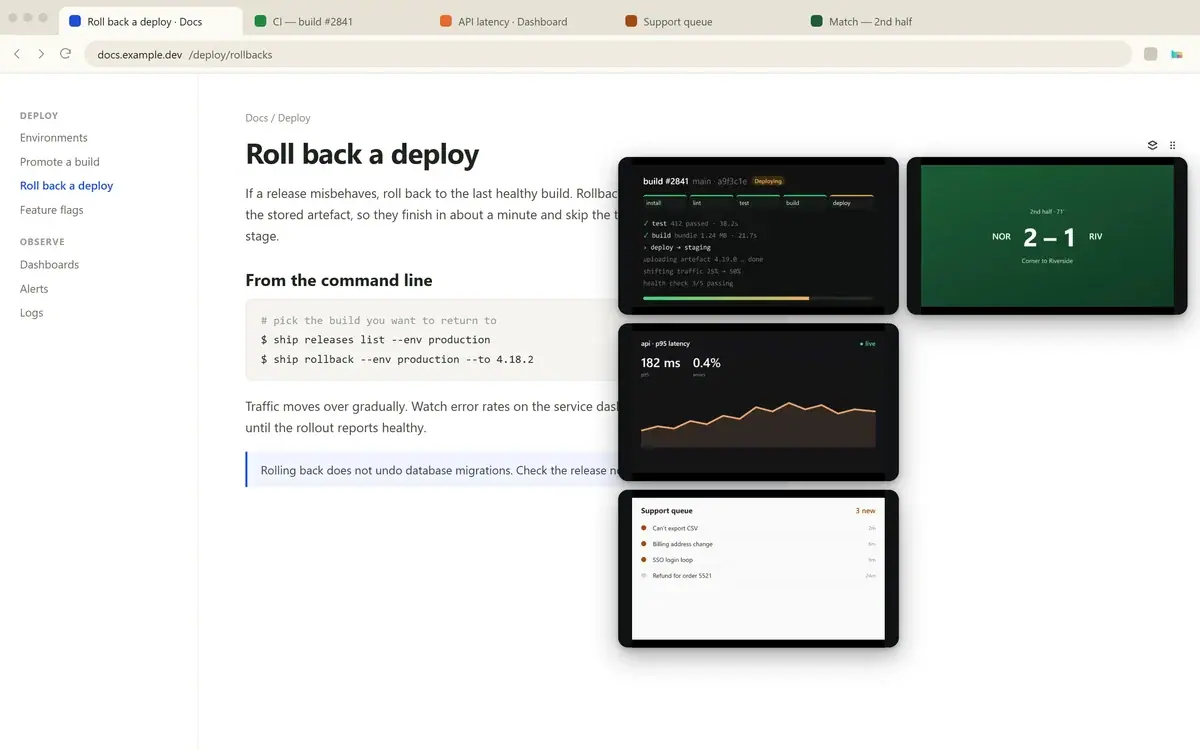
A free Chrome extension that keeps a live view of the tab you care about on every page you visit, so you see it change while you work.
build #2841 main · a9f3c1e Deploying
2nd half · 71'
NOR2 – 1RIV
Corner to Riverside
api · p95 latency live
241 msp95
1.8%errors
Open Tabbies on the page you want to watch and click Cast this tab.
Switch to any other page. The live view follows you in a bubble.
Drag the bubble to either edge and pull the corner to resize it.
Cast a few tabs and they stack like cards. Open the stack into a grid to see them all side by side.
Click Cast this tab and you're done. No screen-share picker, and no “Sharing this tab” bar across the page.
Chrome's picture-in-picture only takes video. Tabbies shows any web page: a build, a chart, a score, a queue.
MIT licensed. Read how it works, or build it yourself. View on GitHub
The live view goes straight from one tab to another, scaled to the size you see it. No account, no servers, no analytics.
Measured on Tabbies 1.0 with one 320px bubble in Chrome 151.
A bug, a missing feature, or a use I never thought of. I'm Lam, I made Tabbies, and I read every message.